

Views: 0
Everything Indian startups need to know about WordPress website development in 2026, including costs, themes, plugins, SEO setup, and a step-by-step build process.
Table of Contents
- 1 Introduction
- 2 What Is WordPress, and Why Do Startups Still Choose It?
- 3 Core Components of a WordPress Website
- 4 Step 1: Define Your Website’s Purpose and Goals
- 5 Step 2: Choose the Right Hosting Provider
- 6 Step 3: Select a Theme That Matches Your Brand and Needs
- 7 Step 4: Install Essential Plugins for Functionality and SEO
- 8 Step 5: Build Core Pages With Clear Structure
- 9 Step 6: Optimize for Mobile and Page Speed
- 10 Step 7: Set Up Proper SEO Foundations
- 11 Step 8: Implement Security Best Practices
- 12 Step 9: Plan for Ongoing Maintenance
- 13 WordPress Development Cost Breakdown for Startups in 2026
- 14 WordPress vs Page Builders: Gutenberg, Elementor, and Beyond
- 15 Common Mistakes Startups Make With WordPress Development
- 16 When WordPress Might Not Be the Right Choice
- 17 Frequently Asked Questions
- 18 Conclusion
- 19 Need Website for Your Business?
Introduction
WordPress has been around for over two decades, and despite countless newer platforms entering the market, it remains one of the most practical choices for startups building their first website in 2026. Its combination of affordability, flexibility, and ease of use makes it particularly well-suited to early-stage businesses that need to launch quickly without committing to a large development budget upfront.
For founders evaluating their options, understanding exactly what WordPress development involves, what it costs, and how to do it properly, makes the difference between a website that genuinely supports business growth and one that becomes a constant source of frustration. This guide walks through everything a startup needs to know before building on WordPress in 2026.
What Is WordPress, and Why Do Startups Still Choose It?
WordPress is an open-source content management system that powers a significant portion of websites worldwide, ranging from simple personal blogs to complex business websites and online stores. Its core appeal lies in accessibility: founders without coding knowledge can build, manage, and update a website themselves, while developers still have the flexibility to build genuinely custom functionality when needed.
For startups specifically, WordPress offers a rare combination of speed and depth. You can launch a basic, functional website within days using existing themes, while still having the option to expand into a fully custom, sophisticated site as the business grows, without necessarily needing to switch platforms entirely. This flexibility is a major reason WordPress remains relevant even as newer, more specialized platforms have emerged.
Core Components of a WordPress Website
A WordPress website is built from several core components working together. The WordPress core software itself handles the fundamental content management functionality. Themes control the visual design and layout, ranging from free, simple templates to premium, highly customizable options. Plugins extend functionality, covering everything from SEO optimization and contact forms to e-commerce capability and security features.
Hosting, while technically separate from WordPress itself, is equally essential, since the quality of your hosting provider directly affects your site’s speed, reliability, and security. Understanding how these pieces work together helps founders make informed decisions throughout the development process, rather than treating WordPress as a single, monolithic product.
Step 1: Define Your Website’s Purpose and Goals
Before selecting themes or plugins, get clear on exactly what your website needs to accomplish. Is it primarily a lead generation tool, an informational brochure site, a content marketing hub supporting SEO growth, or the foundation for an online store? Each goal shapes different decisions throughout the build process, from page structure to plugin selection to overall design priorities.
Startups that skip this step often end up with a generic, unfocused website that doesn’t clearly guide visitors toward any specific action, regardless of how polished the design looks. Clarity here, before any technical work begins, consistently produces a more effective final result.
Step 2: Choose the Right Hosting Provider
Hosting quality significantly affects your website’s speed, uptime reliability, and security, making it one of the more important early decisions in the WordPress development process. Shared hosting plans offer the lowest cost, typically a few hundred rupees monthly, and work reasonably well for early-stage, lower-traffic websites, though performance can degrade as traffic grows due to shared server resources.
Managed WordPress hosting, designed specifically to optimize WordPress performance and security, typically costs more, often one to five thousand rupees monthly, but offers meaningfully better speed, automatic updates, and built-in security features particularly valuable for business-critical websites. For startups expecting meaningful traffic or relying on their website for lead generation or sales, investing in quality managed hosting from the start often proves worthwhile compared to the recurring performance issues cheaper shared hosting can create.
Step 3: Select a Theme That Matches Your Brand and Needs
WordPress themes range from free, simple options suitable for basic informational sites to premium, highly customizable themes designed for specific industries or use cases. When selecting a theme, prioritize clean, fast-loading code over visually flashy designs packed with unnecessary animations and effects, since heavier themes often hurt page speed and mobile performance significantly.
Look specifically for themes that are regularly updated and well-supported, since outdated, abandoned themes can create both security vulnerabilities and compatibility issues with newer WordPress versions or plugins over time. Many startups find that a clean, well-coded premium theme, customized to match their specific brand colors and typography, offers the best balance of professional appearance and genuine performance.
Step 4: Install Essential Plugins for Functionality and SEO
Plugins extend WordPress’s core functionality, and selecting the right ones matters significantly for both performance and capability. Essential categories typically include an SEO plugin for managing meta tags, sitemaps, and on-page optimization, a caching plugin to improve page load speed, a security plugin protecting against common vulnerabilities and attacks, and a backup plugin ensuring your site’s content and data are regularly saved and recoverable.
Resist the temptation to install excessive plugins for every minor feature, since each additional plugin adds potential performance overhead and increases the surface area for possible conflicts or security vulnerabilities. A focused set of well-maintained, genuinely necessary plugins consistently outperforms a website cluttered with dozens of rarely-used additions.
Step 5: Build Core Pages With Clear Structure
Most startup websites need a core set of pages working together cohesively: a homepage clearly communicating your value proposition, an About page building trust and credibility, a Services or Products page detailing your specific offering, a Contact page making it easy for visitors to reach you, and often a Blog section supporting ongoing content marketing and SEO growth.
Structure these pages with a clear, logical navigation menu, ensuring visitors can easily find what they’re looking for without confusion. Each page should have a clear purpose and call-to-action, rather than existing simply because “most websites have this page,” ensuring every part of your site genuinely serves your overall business goals.
Step 6: Optimize for Mobile and Page Speed
Given how much traffic in India arrives through mobile devices, rigorously testing your WordPress site’s mobile experience is essential, not optional. Most modern WordPress themes are responsive by default, but actual performance should be tested directly on real mobile devices rather than assumed based on a desktop preview.
Page speed optimization typically involves compressing images before uploading, using a caching plugin to reduce server load, minimizing unnecessary plugins and scripts, and choosing quality hosting capable of handling your expected traffic without significant slowdown. These factors directly affect both user experience and search engine rankings, making speed optimization a genuine business priority rather than a purely technical concern.
Step 7: Set Up Proper SEO Foundations
WordPress’s plugin ecosystem makes foundational SEO setup relatively accessible even for non-technical founders. This typically includes configuring an XML sitemap for search engines to properly crawl your site, setting up clear, keyword-relevant meta titles and descriptions for each page, ensuring proper heading structure throughout your content, and connecting your site to Google Search Console for ongoing performance monitoring.
Beyond these technical basics, genuine SEO success still depends on the underlying content quality and keyword strategy guiding what you actually publish, meaning the technical setup creates the foundation, but ongoing content strategy determines how well that foundation actually performs in search rankings over time.
Step 8: Implement Security Best Practices
WordPress’s popularity makes it a frequent target for automated attacks, making proactive security measures essential rather than optional for any business-critical website. This includes keeping WordPress core, themes, and plugins consistently updated, using strong, unique passwords combined with two-factor authentication for admin access, installing a reputable security plugin to monitor and block common attack patterns, and maintaining regular automated backups in case recovery is ever needed.
Many startups overlook security until after an incident occurs, at which point the cost and disruption of recovery far exceeds the modest ongoing effort required for proper preventive maintenance from the start.
Step 9: Plan for Ongoing Maintenance
A WordPress website isn’t a one-time build that runs indefinitely without attention. Ongoing maintenance includes regular core, theme, and plugin updates, periodic content reviews and updates to keep information accurate and fresh, regular backups, and monitoring for any security or performance issues that emerge over time.
Startups without dedicated technical staff often benefit from either a maintenance retainer with a freelancer or agency, or at minimum, a clear internal process and schedule for handling these ongoing technical responsibilities, rather than leaving the website unmaintained after initial launch and discovering problems only once something breaks visibly.
WordPress Development Cost Breakdown for Startups in 2026
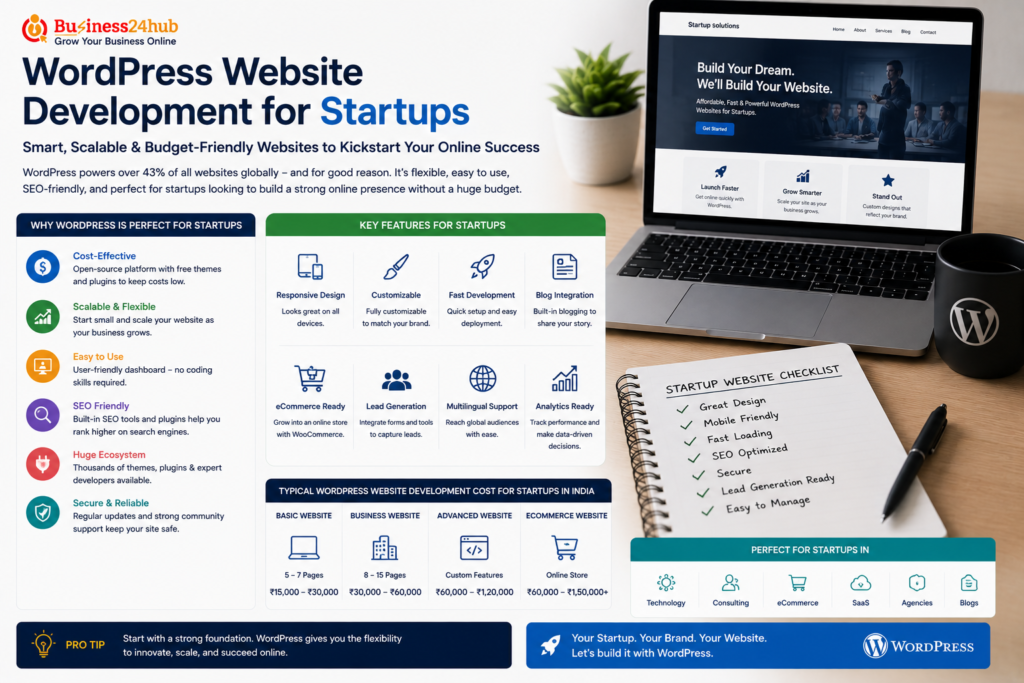
A basic WordPress website, using an existing premium theme with standard customization and five to eight pages, typically costs between forty thousand and one and a half lakh rupees when built by a freelancer, or one and a half lakh to three lakh rupees through an agency including more thorough design customization and SEO setup.
For startups needing more custom functionality, such as membership areas, booking systems, or e-commerce integration through WooCommerce, costs typically increase to a range of one and a half lakh to four lakh rupees, depending on the specific complexity of features required. Ongoing costs beyond the initial build include hosting, typically a few thousand rupees monthly for quality managed hosting, any premium plugin or theme licensing fees, and either internal time or a maintenance retainer for ongoing updates and content management.
WordPress vs Page Builders: Gutenberg, Elementor, and Beyond
WordPress’s native block editor, Gutenberg, has become significantly more capable in recent years, allowing reasonably flexible page design without needing a separate page builder plugin for many common use cases. For startups wanting more advanced visual design flexibility without custom code, page builder plugins like Elementor remain popular, offering drag-and-drop design capability that goes beyond Gutenberg’s native functionality.
The trade-off with heavier page builder plugins is generally a small performance cost, since these tools often add additional code and complexity compared to using Gutenberg’s native, more lightweight editing capability. For startups prioritizing maximum page speed, sticking closer to native Gutenberg blocks, supplemented by a well-coded theme, often produces better performance than a heavily plugin-dependent page builder setup, though the visual flexibility trade-off is a reasonable consideration depending on specific design needs.
Common Mistakes Startups Make With WordPress Development
Choosing cheap, low-quality hosting to save a small amount monthly often results in poor site speed and reliability issues that ultimately cost more in lost conversions and credibility than the hosting savings were worth.
Installing excessive plugins for every minor feature need, without considering cumulative performance impact, frequently leads to a slow, bloated website that underperforms despite individually reasonable plugin choices.
Neglecting regular updates and security maintenance until after a security incident occurs is a common and costly oversight, given how frequently WordPress sites are targeted by automated attacks specifically because of the platform’s popularity.
Choosing a visually flashy theme without considering actual page speed and mobile performance often results in a website that looks impressive in a demo but underperforms significantly with real users on real devices and connections.
Treating the website as finished immediately after launch, without planning for ongoing content updates, technical maintenance, or SEO refinement, leads many startup websites to gradually become outdated and less effective over time compared to consistently maintained competitors.
When WordPress Might Not Be the Right Choice
While WordPress suits the majority of startup website needs well, it’s worth recognizing when it isn’t the ideal fit. Startups building highly interactive, application-like products with complex real-time functionality, custom user dashboards, or sophisticated, unique interactive features often find WordPress’s architecture limiting, making custom development frameworks a more appropriate choice for these specific cases.
Similarly, startups anticipating extremely high traffic volumes or complex, highly specific technical requirements that go well beyond WordPress’s typical plugin-based customization model may find better long-term value investing directly in custom development, even with the higher upfront cost that approach typically carries.
Frequently Asked Questions
1. Why is WordPress Website Development a good choice for startups in 2026?
WordPress Website Development is ideal for startups because it is affordable, scalable, SEO-friendly, and easy to manage. It offers thousands of themes and plugins that help businesses launch professional websites quickly without high development costs.
2. How much does WordPress Website Development cost for a startup?
The cost of WordPress Website Development depends on your requirements, such as custom design, premium plugins, eCommerce functionality, and integrations. A basic startup website generally costs less than a fully customized business website.
3. Is WordPress Website Development SEO-friendly?
Yes. WordPress Website Development is one of the most SEO-friendly website solutions available. With proper optimization, fast loading speed, mobile responsiveness, and SEO plugins, WordPress websites can achieve strong search engine rankings.
4. How long does WordPress Website Development take?
A standard WordPress Website Development project usually takes 1–4 weeks, depending on the number of pages, custom features, content preparation, and design complexity.
5. Can startups scale their business with WordPress Website Development?
Absolutely. WordPress Website Development allows startups to add new pages, blogs, products, payment gateways, booking systems, CRM integrations, and other advanced features as the business grows.
6. Is WordPress Website Development suitable for eCommerce startups?
Yes. By integrating WooCommerce, WordPress Website Development enables startups to build secure online stores with product management, payment gateways, inventory tracking, shipping options, and customer accounts.
7. Does WordPress Website Development support mobile-friendly websites?
Yes. Modern WordPress Website Development focuses on responsive design, ensuring your website works smoothly across smartphones, tablets, and desktops, which also improves SEO performance.
8. Why should startups hire professionals for WordPress Website Development?
Professional WordPress Website Development ensures better website security, faster performance, SEO optimization, clean coding, regular maintenance, and a user-friendly experience that helps startups build credibility and generate more leads.
Conclusion
WordPress remains a genuinely strong choice for startup website development in 2026, offering an effective balance of affordability, flexibility, and ease of ongoing management that few other platforms match for typical early-stage business needs. Getting the most value from WordPress depends less on the platform itself and more on making deliberate choices around hosting quality, theme selection, plugin discipline, and ongoing maintenance, rather than treating the build as a one-time task completed and forgotten after launch.
The startups that get genuine long-term value from WordPress aren’t necessarily the ones with the most elaborate, feature-packed sites. They’re the ones that build a clean, fast, properly maintained foundation aligned with their actual business goals, then consistently invest in keeping that foundation healthy and current as their business and content needs continue to grow.
Need Website for Your Business?
🟡Business24Hub provides complete IT, web development, software development, digital marketing, branding, SEO, mobile app development, and business consulting services to startups, entrepreneurs, SMEs, and enterprises across India.
🟡For other Legal and Trademark related services Visit
👉 Money Recovery Cases
👉 Property Disputes
👉 Business & Licence Registrations
🟡 Protect Your Rights
👉 Domestic Violence Legal Support
👉 Stridhan Recovery
👉 Mutual Consent Divorce
👉 Contested Divorce Filing
👉 Child Custody and Maintenance
👉 Matrimonial Property Settlement
👉 NRI Divorce Services
👉 Alimony and Maintenance
📞 Call Now: +91 8595439395
🕐 Free Consultation: Monday to Saturday, 10 AM to 6 PM

I’m Aryan Yadav, passionate about SEO and Digital Marketing with a strong interest in helping businesses grow online. I enjoy learning new strategies, exploring digital trends, and creating ideas that deliver value. I believe in continuous growth, creativity, and building meaningful results through smart work and dedication.

